
USALI P&L structure (Summary Operating Statement) – a practical guide

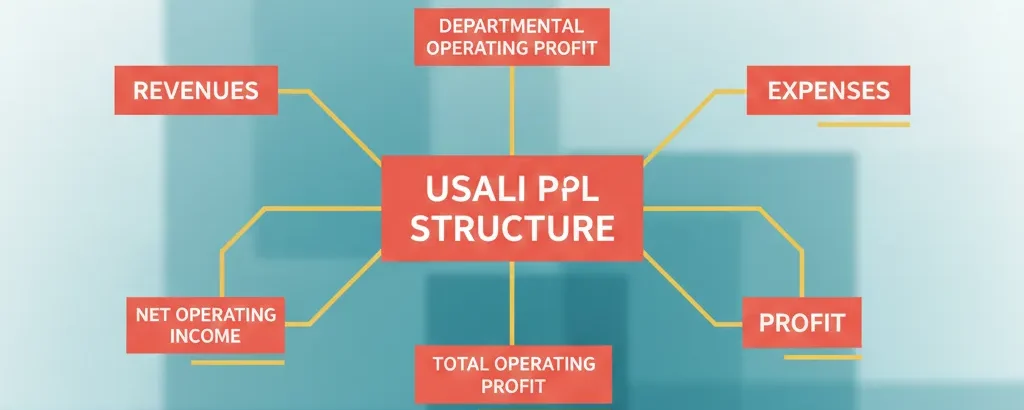
A “USALI P&L” is essentially the Summary Operating Statement supported by a set of standard department schedules. The power of USALI is that it creates consistent profit “layers” (Departmental Profit → GOP → EBITDA/Net Income), so hotels and resorts can benchmark performance apples-to-apples – even when their operations differ.
USALI is not a replacement for GAAP/IFRS financial statements; it’s a standardized operating reporting framework intended for consistent analysis and benchmarking, while being designed to align with GAAP and consider IFRS.
1) The USALI “cascading” P&L: the profit levels everyone should understand
USALI is built so each layer answers a different operational question:
A) Departmental Profit (by revenue-producing department)
Question: “Is each operating department being run profitably based on the costs it directly controls?”
- Rooms Department Profit (Schedule 1)
- Food & Beverage Department Profit (Schedule 2)
- Other Operated Departments Profit (Schedule 3)
B) Total Departmental Income (sometimes shown as “Gross Operating Income”)
Question: “How much profit do our operated departments generate before we pay the shared overhead?”
USALI 12 materials commonly label this as Total Department Income (Gross Operating Income).
C) Gross Operating Profit (GOP)
Question: “How profitable is the hotel after shared overhead, but before management fees and ownership-type costs?”
GOP is shown after deducting Undistributed Operating Expenses from Total Departmental Income.
D) EBITDA / Net Income views
USALI supports different “bottom-line” views depending on whether you’re reporting for owners or operators. For example, the 11th edition introduced formats where EBITDA is a key subtotal, and then:
- Operators often show EBITDA less Replacement Reserve
- Owners often show Net Income after Interest/Depreciation/Amortization/Taxes
(Exact presentation varies by owner/operator reporting package, but the logic stays consistent.)
2) The top section: Operating Revenue (the “4 big buckets”)
In the Summary Operating Statement, USALI groups Operating Revenue into standard categories. Under USALI 12 summaries you’ll typically see:
- Rooms
- Food & Beverage
- Other Operating / Other Operated Departments (with clarity on Minor Operated Departments)
- Miscellaneous Income
→ Total Operating Revenue
Schedule connection
- Rooms → Schedule 1
- Food & Beverage → Schedule 2
- Other Operated Departments → Schedule 3
- Miscellaneous Income → Schedule 4
3) Operating Departments (Schedules 1-3): where “Departmental Profit” is born
This is where your template must be strongest, because these schedules are the foundation for:
- departmental KPIs (e.g., Rooms cost per occupied room)
- operational accountability
- benchmarking
A) Schedule 1 – Rooms
Focus: guestrooms and rooms-related revenues/costs. USALI 12 expands rooms revenue segmentation and adds/expands guidance for items like loyalty member benefits and executive lounge allocations in some cases.
Typical “shape” of the schedule:
- Rooms revenue categories (by segment/channel, depending on your setup)
- Direct expenses:
- Labor + related
- Other direct expenses
- Departmental Profit (Rooms)
| Revenue Line | USALI Schedule | Included in ADR? |
| Base Room Rate | Schedule 1 | Yes |
| Upgrade Fees | Schedule 1 | Yes |
| Executive Lounge Fee | Schedule 1 | Yes |
| No-Show Revenue | Schedule 1 | Yes |
| Cancellation | Schedule 4 (Misc) | No |
| Resort / Destination Fees | Schedule 4 (Misc) | No |
Under USALI, revenue classified as Other Rooms Revenue is included in Total Rooms Revenue and therefore included in ADR – even though some items (like no-shows) do not create occupied room nights. Typical Other Rooms Revenue line items include no-shows, day-use rooms (e.g., hospitality suites/dressing rooms/interviews), early departure fees, late check-out fees, rental of rollaway beds and cribs, and Rooms-related surcharges/service charges (but resort fees are excluded and are recorded in Miscellaneous Income – Schedule 4, not in ADR).
In USALI 12, an Executive Lounge access fee is treated as Other Rooms Revenue and therefore flows into ADR because it’s essentially a rooms-product upgrade: the guest is paying an incremental amount tied to the room stay for enhanced “club level” benefits and access that are bundled with that room category/level, rather than purchasing a standalone F&B outlet product. The same boundary still applies: any separate consumption sales inside the lounge (e.g., paid alcohol, ticketed events) should be recorded in the appropriate non-rooms department, not in Rooms revenue/ADR.
B) Schedule 2 – Food & Beverage
USALI (11th and later) treats F&B as a department schedule that can include multiple venues/outlets without requiring separate schedules for each outlet (properties may still do outlet P&Ls as internal sub-schedules).
Typical “shape”:
- F&B Revenues (venues/banquets/In-Room Dining/other)
- Cost of Sales (Only Food and Beverage costs (net of credits/transfers)
- Labor + related
- Other direct expenses
- Departmental Profit (F&B)
Minibar is no longer F&B
In previous editions, Minibar was typically tucked under the Food & Beverage department. In USALI 12, Minibar Food and Minibar Beverage have been officially removed from Schedule 2 (Food & Beverage).
They are now classified under Schedule 3: Other Operated Departments (specifically as a Minor Operated Department).
C) Schedule 3 – Other & Minor Operated Departments
This schedule covers revenue-generating departments other than Rooms and F&B (e.g., spa, golf, parking, marina, etc. – depending on the property).
USALI 12 clarifies the difference between full Other Operated vs Minor Operated:
- Other Operated Department (Subschedule 3-X): significant revenue + dedicated staff
- Minor Operated Department (Subschedule 3-XX): smaller; often has direct expenses but typically not direct payroll
“Gross vs Net” reporting: Schedule 3 vs Schedule 4
A key USALI idea:
- If it’s gross revenue and expenses (you control pricing/costs/operations) → Schedule 3
- If it’s mostly net income/commissions (and not truly operated) → Schedule 4 (Miscellaneous Income)
This distinction matters a lot for benchmarking and for avoiding “inflated” revenue lines.
USALI keeps Miscellaneous Income inside Operating Revenue (it’s Schedule 4), and it rolls up into Total Operating Revenue. Because Schedule 4 items are generally recorded on a net basis, it usually behaves like “clean contribution” that lifts Total Departmental Profit.
4) Departmental Expenses & Total Departmental Income (Gross Operating Income)
Once you total the three operating departments’ profits (and include any Miscellaneous Income within Total Operating Revenue), the statement shows:
- Total Department Income (or Gross Operating Income) (often referred to as Total Departmental Profit).
- Total Departmental Profit = (Total Operating Revenue − Total Departmental Expenses)
This subtotal is an essential concept:
- Operations teams often “own” this layer (departmental performance).
- Finance and leadership use it as the bridge into overhead control.
5) Undistributed Operating Expenses: the shared overhead (Schedules 5-9)
These are costs that support the whole property and aren’t directly attributable to one operated department.
USALI 12 Summary Operating Statement shows Undistributed Operating Expenses as:
- Administrative & General (A&G) – Schedule 5
- Information & Telecommunications Systems – Schedule 6
- Sales & Marketing – Schedule 7
- Property Operations & Maintenance (POM) – Schedule 8
- Energy, Water & Waste (EWW) – Schedule 9 (renamed/reframed from Utilities)
Why this matters
This section is where many hotels struggle with comparability because:
- costs get misclassified into operating departments to “make GOP look better”
- IT/Systems costs get scattered everywhere
- utilities/waste reporting gets buried in other departments
USALI 12 pushes stronger visibility, especially with the EWW focus and sustainability/consumption metrics.
6) GOP, Management Fees, and Non-Operating (Schedules 10-11)
A) Gross Operating Profit (GOP)
Calculated after Total Undistributed Expenses are deducted.
B) Management Fees – Schedule 10
USALI 12 materials note Management Fees remain a defined line and schedule.
C) Non-Operating Income & Expenses – Schedule 11
This section captures ownership/financing/asset-related items and other non-operating classifications, and USALI 12 continues enhancing guidance here.
7) What’s new/important in USALI 12 (effective January 1, 2026)
- Energy, Water & Waste (EWW) – Schedule 9 (replacing the old Utilities framing)
- Payroll Full-Time Equivalent reporting – Schedule 15 (new)
- Annual Mandatory Brand & Operator Costs – Schedule 16 (new)
- All-Inclusive reporting guidance – Part II (new)
Here is a breakdown of why these specific updates matter:
1. Energy, Water, and Waste (EWW) – Schedule 9
The shift from “Utilities” to “EWW” is more than just a name change; it is about tracking consumption, not just cost.
- The Scope: It now includes Waste Management (trash removal, recycling fees, and hazardous waste disposal), which was previously buried in “Other Expenses.”
- Metric Focus: You are now expected to report metrics like Energy per Occupied Room (POR) and Waste per Occupied Room (POR).
- The Goal: This aligns hotel P&Ls with global ESG (Environmental, Social, and Governance) standards, making it easier for owners to see the ROI on energy-efficient retrofits.
2. Payroll Full-Time Equivalent (FTE) – Schedule 15
Before USALI 12, we tracked labor cost, but comparing labor efficiency across different hotels was difficult because of varying wage scales.
- The Requirement: Every department must now report FTEs (typically calculated as Total Hours Worked / 2,080 hours per year, but local standards may differ).
- The Benefit: This allows for a “Labor Productivity” metric. For example, instead of just seeing that Rooms Labor cost $50,000, you can now see that it took 0.5 FTEs per Occupied Room.
- Contract Labor: Importantly, you must also estimate FTEs for outsourced labor (like third-party housekeeping) to get a true picture of the total human power required to run the hotel.
3. Annual Mandatory Brand & Operator Costs – Schedule 16
This is the “Transparency Schedule.” Owners often felt that the true cost of a brand was hidden across various line items like marketing, GDS fees, and loyalty programs.
- The Consolidation: Schedule 16 pulls all these mandatory costs into one place once a year.
- What’s included: Brand royalties, marketing assessments, guest loyalty program contributions, and technology fees.
- Purpose: It gives owners a clear “Total Cost of Ownership” view, helping them evaluate if the brand’s value justifies its total annual expense.
4. All-Inclusive Reporting – Part II
Historically, USALI was built for “European Plan” hotels (room only). All-Inclusive resorts struggled to fit their “bundled” revenue into the standard F&B and Room categories.
- The Change: Part II provides a standardized way to report the package and non package revenue.
- Revenue Allocation: Package Revenue is not allocated to the individual services within the package (rooms, F&B, entertainment) – it is reported in total.
- KPIs: It introduces new metrics like Revenue Per Guest (RPG), which is often more valuable for all-inclusive resorts than traditional RevPAR.
8) How to design your USALI P&L
Here’s a clean, practical workbook structure you can build:
Tab 1 – “Summary Operating Statement”
Purpose: one-page executive view.
Recommended columns (minimum):
- Month Actual | Month Budget | Var | Var %
- YTD Actual | YTD Budget | Var | Var %
- Prior Year (Month + YTD) (optional but powerful)
Rows (high-level):
- Operating Revenue (4 buckets)
- Departmental Expenses (Rooms, F&B, Other Operated)
- Total Departmental Income
- Undistributed Operating Expenses (Schedules 5–9)
- GOP
- Management Fees
- Non-Operating Income & Expenses
- EBITDA / Net Income view (depending on your reporting model)
Training tip: teach your team to “read” the statement like a waterfall – each subtotal has a management meaning.
Tabs 2-4 – Department schedules (Schedules 1-3)
Each schedule should follow the same internal structure so your team learns one pattern and applies it everywhere:
- Revenue
- Less: Cost of Sales (where applicable)
- Labor Costs & Related Expenses
- Other Expenses
- Departmental Profit
Tab 5 – Miscellaneous Income (Schedule 4)
Keep this separate to avoid mixing “net income” items with operated departmental revenue. (This is a common benchmarking mistake.)
Tabs 6-10 – Undistributed schedules (5-9)
One tab per schedule:
- A&G (5)
- IT/Telecom (6)
- Sales & Marketing (7)
- POM (8)
- EWW (9)
For USALI 12 readiness, add:
- EWW consumption metrics capture (even if operational systems are still maturing)
Tab 11 – Management Fees (Schedule 10)
Show:
- base fee
- incentive fee
- any other contract charges you decide to include here (but be consistent)
Tab 12 – Non-Operating (Schedule 11)
Separate into:
- Income
- Rent
- Property/other taxes
- Insurance
- Other (owner expenses / pre-opening, etc., based on your policy)
Tab 13 – Metrics & KPIs (optional but highly recommended)
Because USALI is built for analysis, add a KPI panel:
- Occupancy, ADR, RevPAR
- F&B metrics (covers/customers, average check)
- Labor productivity (hours/FTE per department, where available—aligning with Schedule 15 concepts)
Tab 14 – Mapping (“COA to USALI”)
This is the hidden hero.
- GL Account → USALI Schedule → Line item caption → Department/Cost Center
It prevents classification drift over time and makes month-end faster.
9) Common classification pitfalls
These are the issues that cause “bad USALI” in real life:
- Putting shared costs into Rooms/F&B to protect GOP or to “hit a departmental margin.”
- Treating commissions/net income as operated revenue (misusing Schedule 3 instead of Schedule 4).
- Scattering technology costs instead of using Schedule 6 (IT/Telecom) (USALI’s intent is visibility and comparability).
- Burying utilities/waste in other departments instead of reflecting Schedule 9 / EWW direction.
- Not being consistent with gross vs net logic across periods.



Responses